

Running a startup often means doing a lot with a small team. You need to understand your customers, manage leads, organize projects, track results, collect payments, and keep everyday work moving without adding unnecessary complexity.
This is where growth navigate startup tools can help. These tools support different areas of a growing business. Some help you understand website visitors and product users, while others make sales, communication, marketing, payments, support, or internal workflows easier to manage.
However, adding more software does not automatically make a startup more productive. A useful startup stack should solve real problems. Every tool should have a clear purpose, and your team should understand why it is being used.
What Are Growth Navigate Startup Tools?
Growth navigate startup tools are software platforms that help startups manage important parts of their business while they grow. They may support customer relationships, analytics, project management, team communication, marketing, automation, payments, accounting, support, or product development.
The term can also refer to online directories that help founders discover software for different startup needs. In either case, the main idea is the same. These tools should make important business processes easier to understand or manage.
For example, CRM software can help a startup keep track of leads, customer conversations, and sales opportunities. Analytics platforms can show where visitors come from and what they do after arriving. Automation software can connect different applications so that repetitive tasks happen without someone completing every step manually.
The number of tools you use is less important than the value each one brings. A simple stack that solves your main problems can be far more useful than a large collection of applications that overlap.
Start With the Problem Before Choosing a Tool
One of the most common mistakes founders make is choosing software because it is popular. They see another startup using a platform and assume their own company needs the same thing.
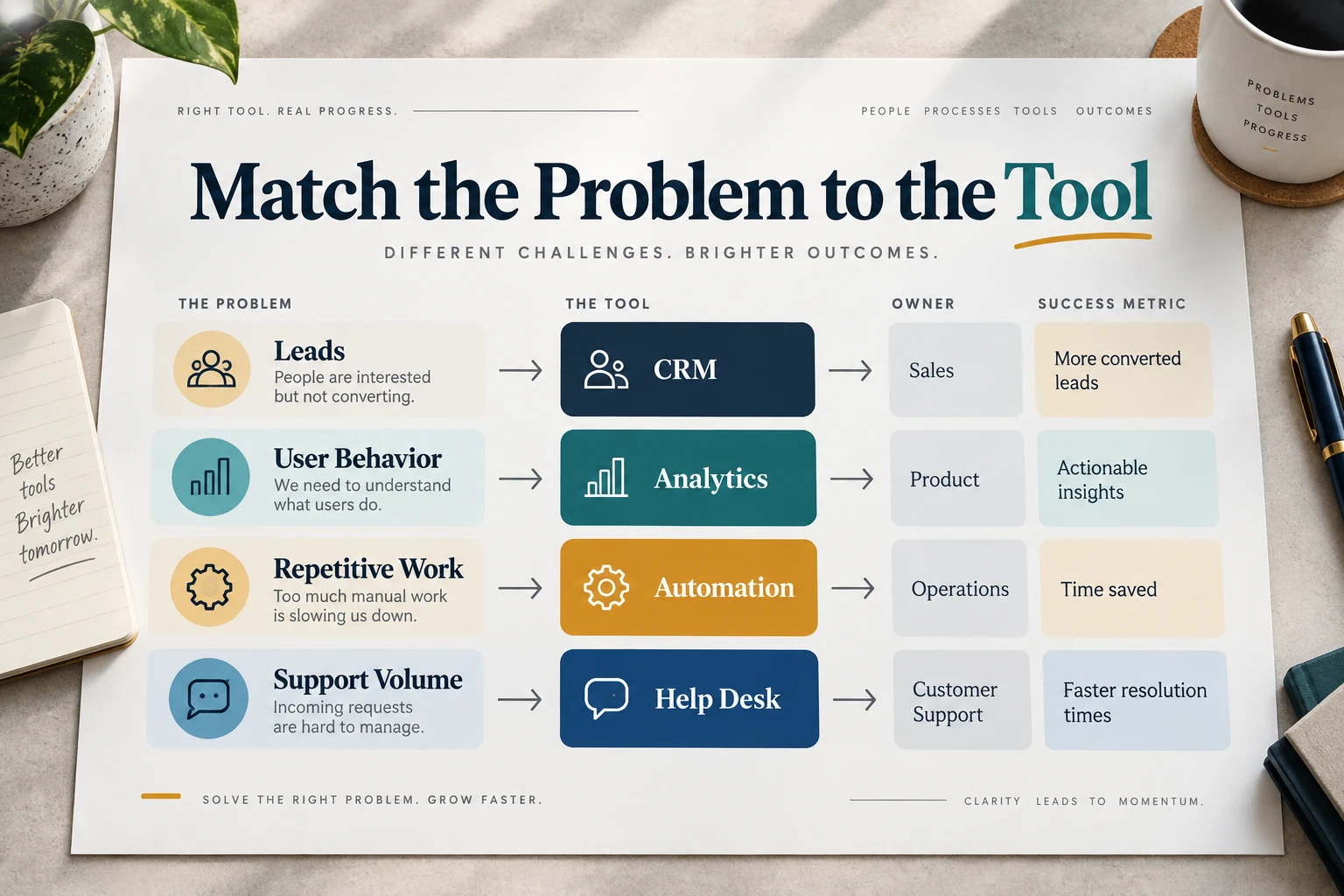
A better approach is to begin with the problem. Look at the areas where work is becoming slow, confusing, repetitive, or difficult to track. You may notice that leads are being forgotten, customer information is scattered across different places, reporting takes too long, or the same administrative tasks are repeated every day. Once the problem is clear, it becomes much easier to decide whether you actually need another tool and what type of tool would help.
You Cannot See What Users Are Doing
If people are visiting your website or using your product but you do not understand what they are doing, analytics should usually be one of the first areas you examine. Basic website analytics can help you understand where visitors come from, which pages they visit, and whether they complete important actions. This can show whether your marketing is attracting the right people and which parts of your website deserve more attention.
Product-focused startups often need deeper information. Tools such as PostHog, Mixpanel, and Amplitude can help teams understand how customers interact with a digital product. They can show where users stop during onboarding, which features people use most often, and whether customers return after their first session.
You do not necessarily need several analytics platforms at the same time. Start with the questions you need answered. Then choose a platform that gives you enough information to make better decisions.
You Keep Losing Track of Leads
A spreadsheet can be enough when a startup only has a small number of potential customers. It becomes more difficult when sales activity starts increasing. Important follow-ups may be missed. Two team members might contact the same person without knowing it. Conversations can become buried in individual inboxes, making it difficult to understand which leads are active and which opportunities need attention.
This is usually the point where customer relationship management software becomes useful. CRM tools such as HubSpot, Pipedrive, Attio, and Zoho CRM can keep contacts, conversations, tasks, and deals organized in one place. You do not need a complicated sales system from the first day of your startup. A CRM becomes valuable when your existing method is no longer reliable.
Your Team Cannot Find Important Information
As more people join a startup, information naturally begins spreading across different places. Some decisions may be buried in email threads. Project details may sit inside spreadsheets. Important instructions may only exist in chat messages or personal notes. This makes everyday work harder because people spend time searching for information instead of using it.
Project and knowledge management tools can help create a more organized system. Notion is commonly used for company documentation, project planning, internal guides, and shared information. Product and development teams may prefer tools such as Linear when they need clearer issue tracking and development workflows.
The right platform depends on your team's needs. A small company does not always need a complex system. What matters is that everyone knows where important information belongs and where to find it later.
Repetitive Work Is Taking Too Much Time
Some business tasks are simple but become expensive because they happen repeatedly. For example, a team member might receive a new website enquiry, copy the person's details into a CRM, notify the sales team, create a follow-up task, and then update another system. None of those actions is especially difficult. The problem appears when the same process has to be completed many times every week.
Automation tools such as Zapier and Make can connect different applications so that routine information moves automatically. A form submission can create a CRM record, alert the correct person, and start another workflow without somebody manually completing every step. Automation works best when the underlying process is already clear. If your workflow changes constantly, automating it too early may create more confusion. First make the process reliable, then automate the repetitive parts.
Customer Questions Are Becoming Hard to Manage
Founders often answer their first customer questions through personal email. This can work well when only a handful of people need support. As the customer base grows, that approach becomes harder to manage. Messages may be missed, different team members may respond without seeing the full conversation, and nobody may know whether an issue has already been solved. Customer support platforms such as Help Scout, Intercom, Zendesk, and Crisp can bring customer conversations into one shared system.
This makes it easier to assign requests, review previous messages, and keep track of unresolved issues. You usually do not need dedicated support software at the beginning. It becomes useful when normal email can no longer manage customer conversations reliably.
Is Growth Navigate One Software Platform?
This is where the search term becomes confusing. Current results point to several separately operated resources with similar names. The Growth Navigate page lists third-party products by use case. A separate startup tool directory provides filters for stage, category, and budget. Another site, Growth Nav Tools, uses a similar phrase. Verify the domain and owner before treating any of them as one product or company.
So you should not assume that “growth navigate startup tools” means one all-in-one application. For most readers, it is more useful to think about the phrase as a way of finding the software needed to run and grow a startup.
The Core Startup Tool Categories That Matter
There is no universal startup stack, but most growing companies eventually need systems covering several common jobs.
| Job | When it becomes useful | Example tools |
|---|---|---|
| Website analytics | You need to understand traffic, acquisition and conversions | Google Analytics 4, Plausible |
| Product analytics | You need to understand in-product behavior, activation or retention | PostHog, Mixpanel, Amplitude |
| CRM and sales | Leads and follow-ups are becoming hard to track | HubSpot, Pipedrive, Attio, Zoho |
| Projects and knowledge | Tasks, documents or decisions are scattered | Notion, Linear, Asana, ClickUp |
| Communication | Team conversations need an organized shared space | Slack, Microsoft Teams |
| Payments and billing | Customers are ready to pay | Stripe and other payment providers |
| Automation | Repeated work is moving data between systems | Zapier, Make |
| Marketing and lifecycle | Customer communication needs to happen consistently or based on behavior | Brevo, Customer.io, Mailchimp |
| Customer support | Customer requests need ownership and history | Help Scout, Intercom, Zendesk, Crisp |
| AI assistance | Repeated writing, research, analysis or development work can be accelerated | General and specialist AI tools |
| No-code building | You need to test a site, workflow or MVP without a large development project | Webflow, Framer, Bubble, Airtable |
These are examples, not requirements. A two-person company should not copy the stack of a 100-person SaaS business. Software should follow complexity rather than create it.
Important Types of Startup Growth Tools
Most growing startups eventually use software across several areas, although the exact combination depends on the business model.
Analytics Tools
Analytics tools help founders understand website traffic, conversions, and customer behavior. Google Analytics can be useful for website-level activity, while product analytics tools such as PostHog, Mixpanel, and Amplitude are designed for deeper information about how people use an application.
CRM and Sales Tools
CRM and sales tools help manage contacts and opportunities. HubSpot, Pipedrive, Attio, and Zoho CRM are examples of platforms that can help when lead management becomes too complicated for spreadsheets or personal inboxes.
Project Management Tools
Project management tools help teams keep work organized. Platforms such as Notion, Linear, Asana, ClickUp, and Trello can be used to manage tasks, projects, documentation, or development work. The best choice depends on how much structure the team actually needs.
Communication Tools
Communication tools such as Slack and Microsoft Teams can make everyday conversations easier to organize, especially for remote teams. However, communication software only works well when the team has clear habits around where decisions and important information should be stored.
Payment and Billing Tools
Payment and billing systems become essential once customers are ready to pay. Stripe is widely used by online businesses for payments and subscriptions, although the right provider will depend on your business model and the locations where you operate.
Marketing Tools
Your marketing strategy should define the job before software is selected.
Marketing tools such as Mailchimp, Brevo, Customer.io, and HubSpot can help businesses manage email communication and customer journeys. Early-stage startups should avoid building complicated marketing automation before there are enough customers or leads to justify it.
Automation Platforms
Automation platforms such as Zapier and Make can connect these different systems. They become especially useful when the same data needs to move repeatedly between applications.
Customer Support Tools
Customer support tools help teams manage questions and problems after customers arrive. Help Scout, Intercom, Zendesk, and Crisp are common examples. These platforms become more important as support volume grows.
AI Tools
AI tools can also support startup work by assisting with research, writing, coding, documentation, analysis, and other repetitive tasks. The goal should still be to solve a clear problem rather than adding AI simply because it is currently popular.
Which Tools Do You Need at Each Startup Stage?
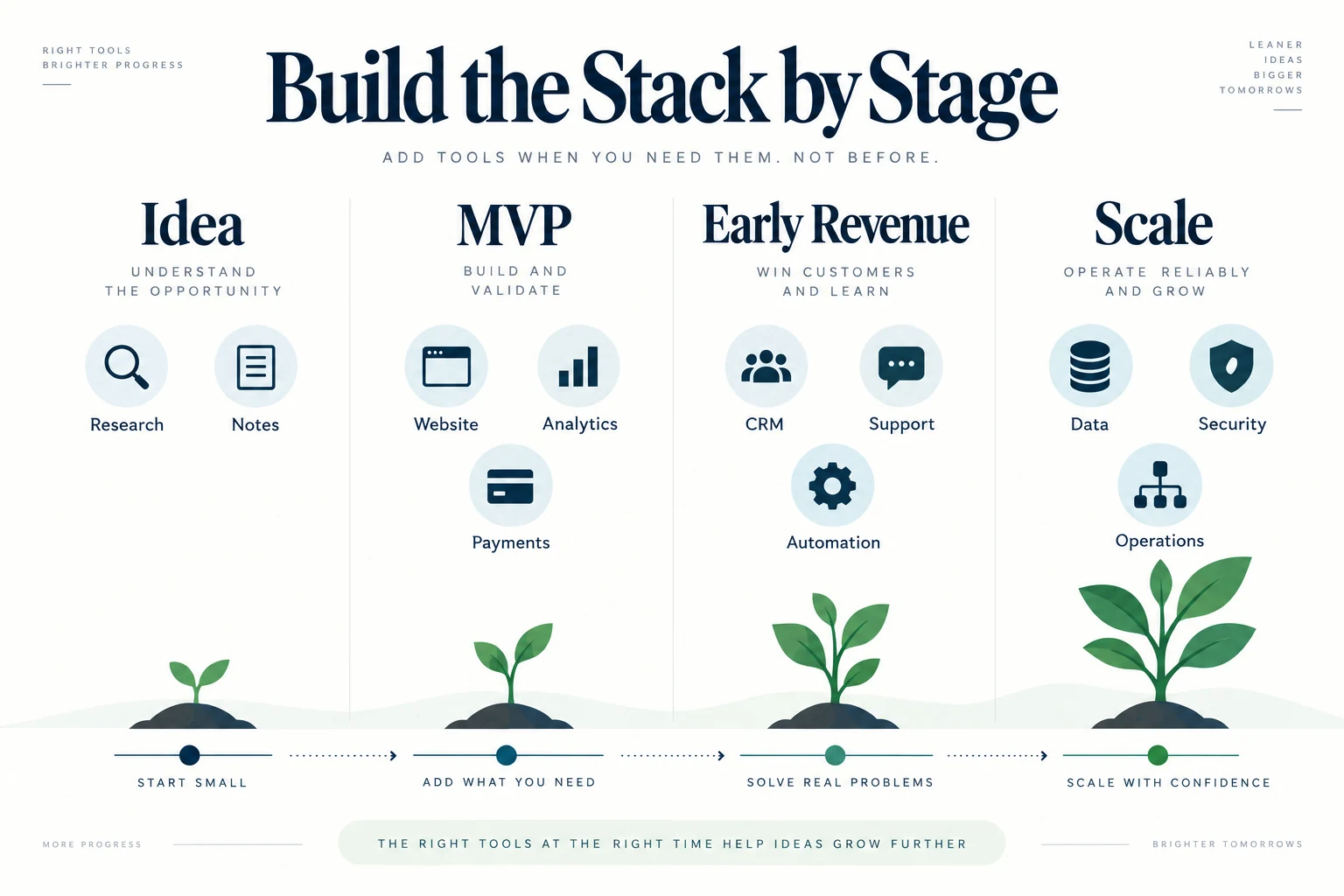
A startup's software needs change as the company grows. A founder testing an idea should not build the same technology stack as a business serving thousands of paying customers.
Idea and Validation Stage
At the idea stage, your main objective is to learn whether people care about the problem you are solving. Speed and simplicity matter more than sophisticated systems.
A basic landing page, a simple analytics setup, somewhere to organize research, and an easy way to communicate with potential customers may be enough. If you are already selling something, you may also need a simple payment option.
Avoid buying software for problems that do not exist yet. An advanced CRM will not help if you have no leads to manage, and expensive support software provides little value when there are only a few customers.
MVP and First Customers
Once people start using your product, your information needs begin to change. You now need to understand how real users behave and where they encounter problems.
Analytics becomes more important at this stage. You may also need simple customer management if you are speaking with leads, conducting demos, or following up with early customers.
If people are paying for the product, a reliable payment system becomes part of your core setup. The software stack is beginning to expand, but each tool should still have a clear purpose connected to a real customer or business process.
Early Revenue Stage
Regular revenue usually brings more complexity. Sales conversations increase, marketing communication becomes harder to manage manually, support questions appear more often, and administrative work begins taking more time.
This is often when startups start introducing a proper CRM, marketing software, support tools, workflow automation, stronger accounting systems, and more detailed analytics.
The important point is to add these systems gradually. Revenue does not mean every process needs specialist software immediately. Focus first on the areas where poor organization is already costing time, money, or opportunities.
Growth and Scaling Stage
At the scaling stage, the challenge often changes from finding software to making existing software work together.
Customer data may live inside a CRM, product activity may be tracked in another system, marketing information may sit somewhere else, and financial data may be managed separately.
At this point, integration becomes more important. Startups often need clearer reporting, better user permissions, cleaner data flows, and stronger control over where information is stored.
The goal is no longer simply to complete a task. It is to create a reliable system where different parts of the company can work together without constantly moving information manually.
Example of a Lean Startup Tool Stack
There is no single software stack that works for every startup. The right combination depends on how you acquire customers, how you sell, what kind of product you offer, and how your team works.
Simple MVP Startup
A small MVP team might use Notion for planning and documentation, along with Linear or Trello for managing tasks. Google Analytics may be enough for basic website traffic, while PostHog could be added if the team needs to understand how users behave inside the product. Stripe can be introduced once customers begin making payments.
That may be all the startup needs at this stage. Adding many more applications would create additional cost and complexity without necessarily solving a real problem.
Founder-Led B2B Startup
A founder-led B2B business usually has different priorities because direct sales conversations are central to growth.
The company may use HubSpot to manage contacts and deals, Notion for documentation, and Slack for team communication. Google Analytics can provide website insights, while Zapier can automate repetitive steps between forms, the CRM, and internal notifications.
In this type of business, CRM software becomes more important because leads and follow-ups directly affect revenue.
Product-Led SaaS Startup
A product-led SaaS company may care more about customer behavior inside the application than traditional sales activity.
It might use PostHog or Mixpanel for product analytics, Stripe for subscriptions, Linear for development work, and Notion for documentation. A customer email platform can be introduced when the business needs to send messages based on customer activity, while dedicated support software can be added once customer conversations become difficult to manage manually.
The important idea is that the stack grows with the business rather than being built all at once.
The Hidden Cost of Startup Software
The monthly subscription is often the easiest cost to see, but it is not the only cost involved. New software takes time to configure. Someone may need to create workflows, add users, set permissions, and connect other systems. Existing information may need to be cleaned and migrated.
Employees also need time to learn the platform. If the software is complicated, the training cost can be significant even if the monthly subscription appears affordable.
Integrations require maintenance as well. Automations may break, APIs can change, and business processes evolve. Someone eventually has to keep those connections working.
There is also an attention cost. Every additional platform creates another place where notifications appear, information may be stored, and people have to search for answers. For this reason, the cheapest software is not always the lowest-cost choice overall.
Signs Your Startup Has Too Many Tools
You may have a tool-sprawl problem when:
- two systems perform essentially the same job
- employees are unsure where information should be stored
- the same data is entered more than once
- integrations constantly need repair
- important tools have very low usage
- nobody can explain why a subscription still exists
- information has to be manually reconciled across platforms
The answer is not automatically to replace everything with one giant platform. Consolidation only helps when the replacement genuinely handles the required workflows. Sometimes two focused products are easier to operate than one complicated suite.
Signs You Have Outgrown Your Current Stack
Being lean does not mean refusing to upgrade. Simple tools should be replaced when their limitations begin creating real problems. Common signals include:
- leads are being forgotten
- reporting requires hours of spreadsheet work
- several people edit the same data differently
- customer requests are getting lost
- access permissions are becoming difficult to control
- integrations rely on fragile manual work
- important business questions cannot be answered with the data you have
At that point, paying for better software may be cheaper than continuing with a workaround.
How to Audit Your Startup Tool Stack
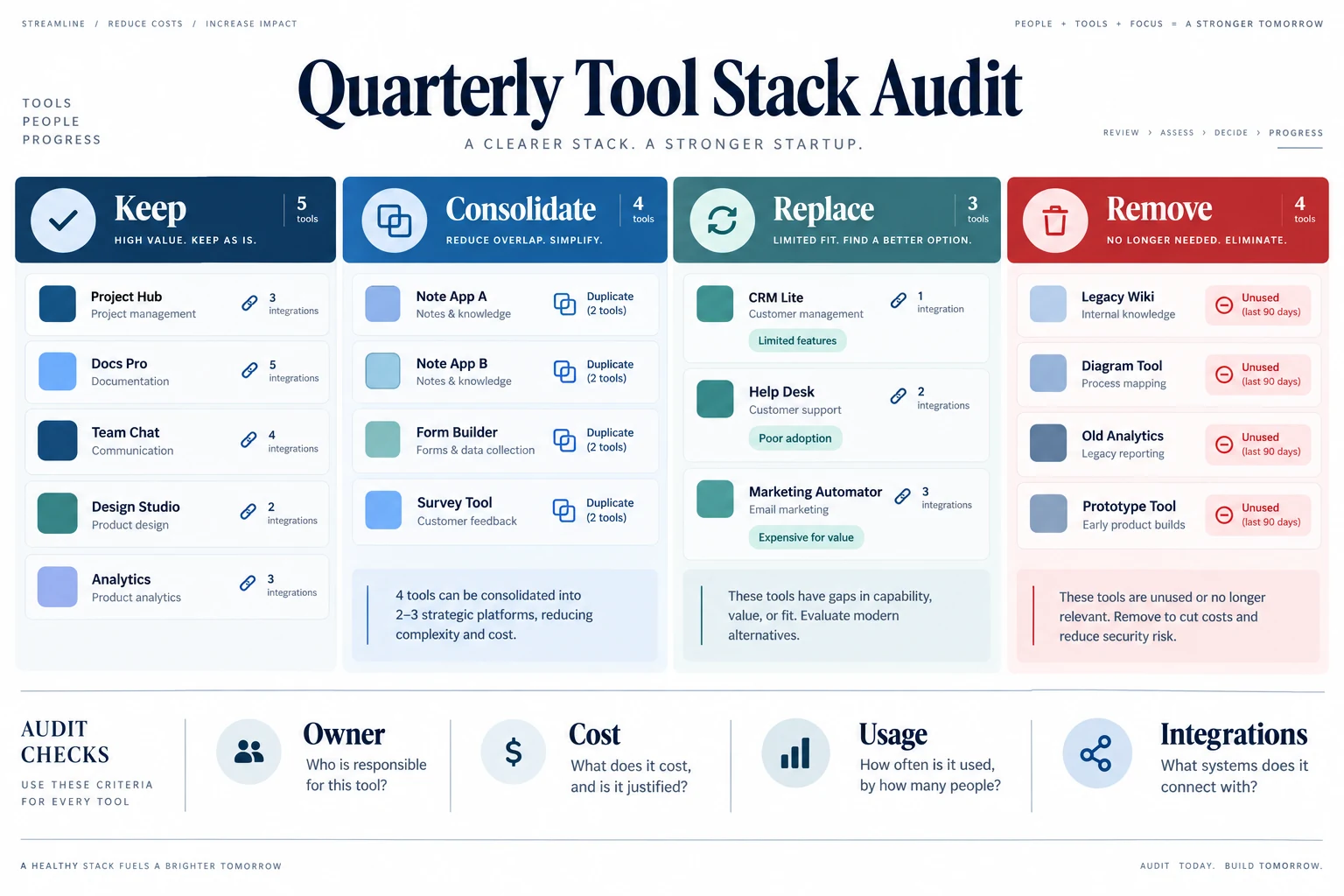
A regular software audit can help prevent unnecessary subscriptions from building up. Begin by listing every platform your company uses. For each one, identify who is responsible for it, what problem it solves, who actually uses it, what important information it contains, and which other systems depend on it.
Then decide whether the tool should be kept, consolidated, replaced, or removed. A tool should be kept when it solves an important problem and is regularly used. It may be consolidated when another existing platform can perform the same function well enough.
Replacement makes sense when the workflow is still important but the current software no longer meets the company's needs. Removal is appropriate when a platform is rarely used or the original reason for buying it no longer exists. The purpose of this audit is not to create the smallest software stack possible. It is to make sure every tool still deserves its place.
Build the Smallest Stack That Solves the Work
The right startup stack is not the one with the most tools. It is the one that gives the team reliable information, clear ownership, and less repetitive work without creating unnecessary cost or fragmentation. Add software when a real process needs support, measure whether it solves that problem, and review the stack regularly as the company changes.