

One retailer drops the advertised price of your product. Another seller notices and follows. Soon, the same item appears at several different prices across marketplaces and online stores. For a brand selling through a large reseller network, spotting where that first price change happened can be difficult.
That is the job of MAP monitoring.
MAP monitoring is the process of checking advertised product prices across retailers, marketplaces, and other sales channels to see whether they comply with a brand's Minimum Advertised Price policy.
Modern MAP monitoring software can automate much of this work. It can collect prices, match listings with the correct products, identify potential MAP violations, save evidence, and alert the people responsible for reviewing them.
But effective MAP monitoring involves more than watching numbers change.
You need to know exactly which product is being advertised, which seller is responsible, what promotion is being used, what your policy allows, and whether the evidence is strong enough to act on.
What Is MAP Monitoring?
MAP monitoring is the ongoing process of tracking the publicly advertised prices of products and comparing those prices with the Minimum Advertised Price set by a brand or manufacturer.
For example, imagine a manufacturer sets the MAP for a pair of headphones at $149.
A retailer advertises the headphones online for $149.
No issue.
Another retailer publicly displays them for $129.
That listing may need to be flagged as a potential MAP violation and reviewed against the manufacturer's policy.
Monitoring can happen across individual retailer websites, dealer sites and large ecommerce channels such as Amazon, Walmart, eBay and Google Shopping.
The basic comparison is straightforward:
Observed advertised price < MAP threshold = potential violation
The difficult part is reliably finding the correct listings, identifying the seller, interpreting promotions and maintaining useful evidence.
What does MAP stand for in retail?
In retail, MAP stands for Minimum Advertised Price.
It refers to a minimum price established by a brand or manufacturer for the public advertising of a covered product.
The word advertised is important.
MAP should not automatically be treated as the same thing as the final price a shopper pays.
That brings us to one of the most important distinctions in MAP monitoring.
MAP, MSRP and the Actual Selling Price Are Not the Same Thing
People often use MAP and MSRP as though they mean the same thing. They do not.
Consider this example:
| Pricing term | Example | What it means |
|---|---|---|
| MSRP | $199 | The manufacturer's suggested retail price |
| MAP | $179 | The minimum price covered by the brand's advertising policy |
| Final selling price | Varies | The amount the customer ultimately pays |
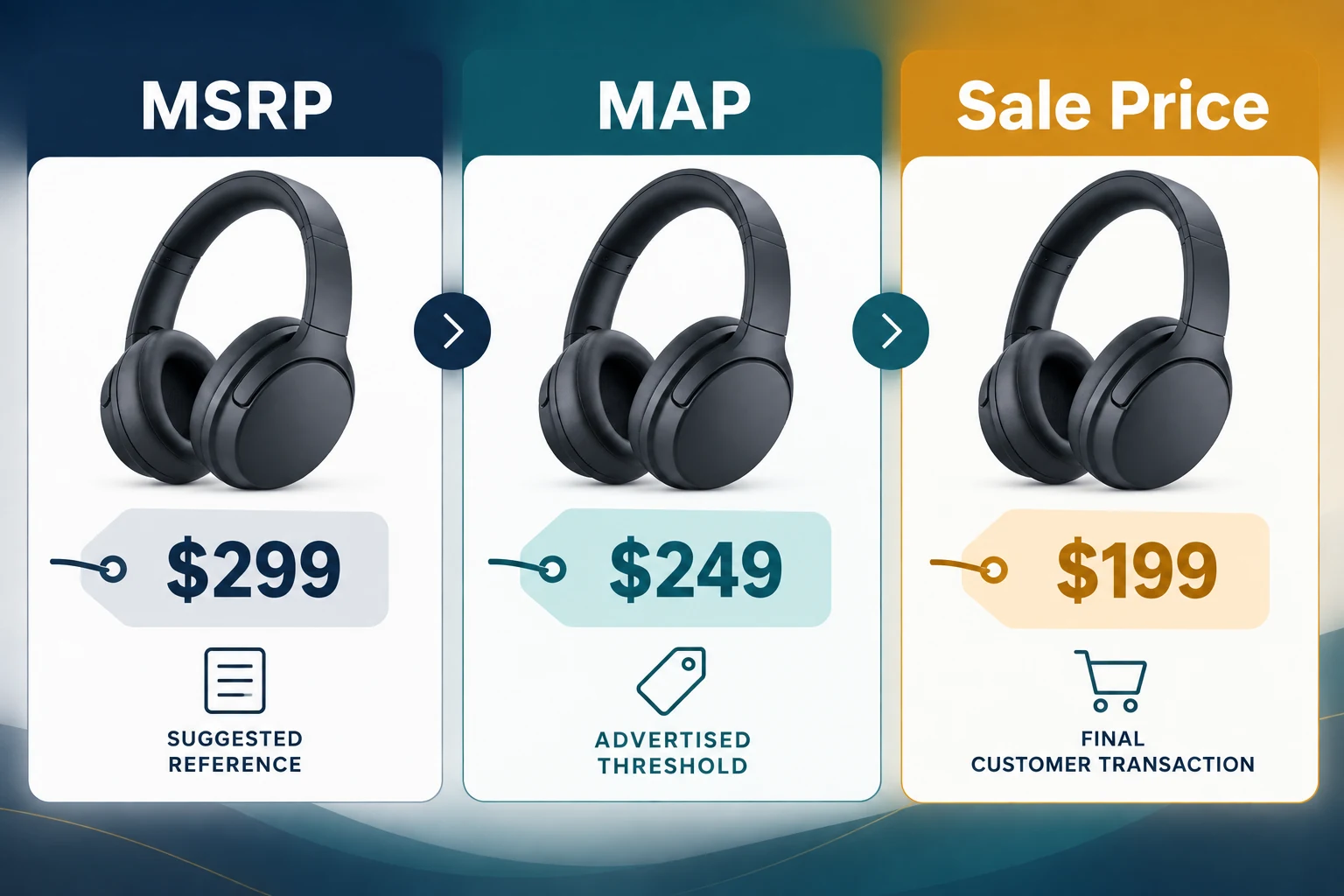
MSRP stands for Manufacturer's Suggested Retail Price. It is a recommended retail price.
MAP deals with how a product is publicly advertised under the applicable policy.
The transaction price is what the customer actually pays.
This difference matters because MAP monitoring software should not blindly flag every lower number it encounters.
Whether a coupon, cart price, private offer, bundle or other promotion falls within a particular MAP policy depends on how that policy is written and how the offer is presented.
That is why monitoring should produce reviewable evidence rather than simply generating an unexplained red warning.
What Is a MAP Violation?
A MAP violation generally refers to a situation where a covered product is publicly advertised below the minimum price allowed under the applicable MAP policy.
The simplest example looks like this:
MAP: $100
Advertised price: $89
Difference: $11 below MAP
That seems easy.
Online retail quickly makes it more complicated.
A straightforward below-MAP listing
Suppose Product A has a MAP of $100.
A dealer's product page says:
Our price: $84.99
If the product and advertisement are covered by the policy and no approved exception applies, the listing may be identified as a violation.
Coupons and promotional pricing
Imagine that the page displays:
$100 - use code SAVE20 for 20% off
The advertised base price meets MAP, but the publicly promoted coupon changes the effective offer.
Whether that counts under the brand's policy depends on its wording and promotional rules.
A useful monitoring system should therefore record more than the main price.
It may need to capture coupon text, promotion details and screenshots.
Bundles and multipacks
Bundles can create another problem.
Suppose one unit has a MAP of $20.
A retailer advertises a five-pack for $80.
The system may need to determine whether the MAP policy applies per item, to the bundle itself, or through another rule.
Simply comparing $80 with $20 would obviously be meaningless.
This is one reason accurate product and offer matching matters.
Different sellers on the same marketplace
A product page on a marketplace may involve several sellers.
Seller A may advertise at MAP.
Seller B may advertise below MAP.
The product URL alone does not tell the whole story.
Good MAP violation monitoring should capture the seller associated with the observed price whenever possible.
Approved promotions
Not every temporary price difference is necessarily non-compliance.
A brand may authorize:
- seasonal promotions;
- clearance periods;
- product-specific exceptions;
- selected channels;
- particular dates;
- approved coupon campaigns.
Monitoring systems therefore need current policy data.
Otherwise, an approved promotion can generate hundreds of false alerts.
What a useful violation record looks like
A useful record might contain:
Product: ABC-100 Wireless Headphones
SKU: ABC-100-BLK
MAP: $149.00
Advertised price: $129.99
Difference: $19.01
Retailer: Example Electronics
Seller: Example Electronics
Channel: Retailer website
URL: Recorded product-page URL
Observed: September 17, 2026, 10:35 AM
Promotion detected: None
Screenshot: Saved
Status: Pending review
That record gives a brand something it can investigate.
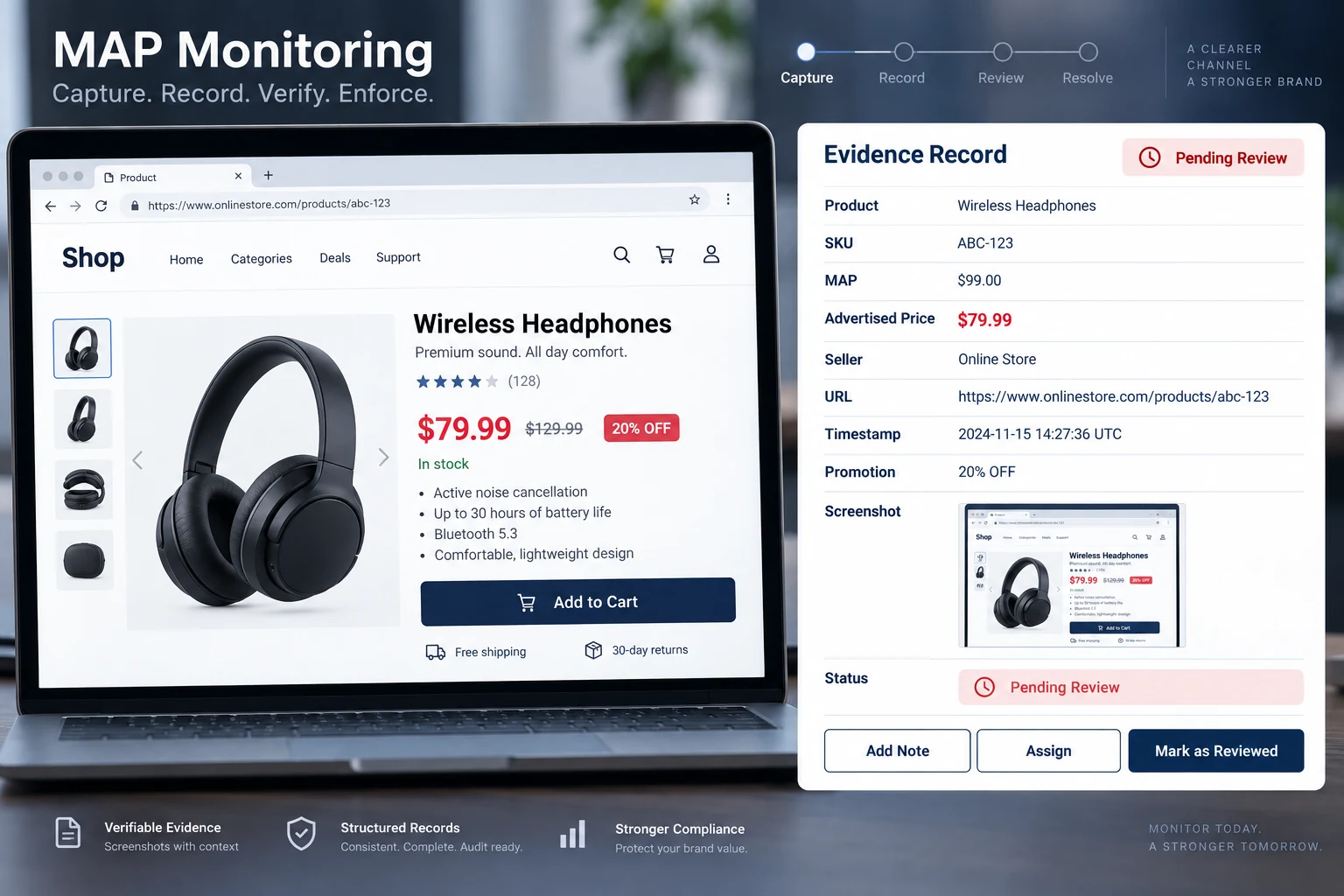
An alert that simply says “MAP violation found” is much less useful.
How MAP Monitoring Works From Listing to Alert
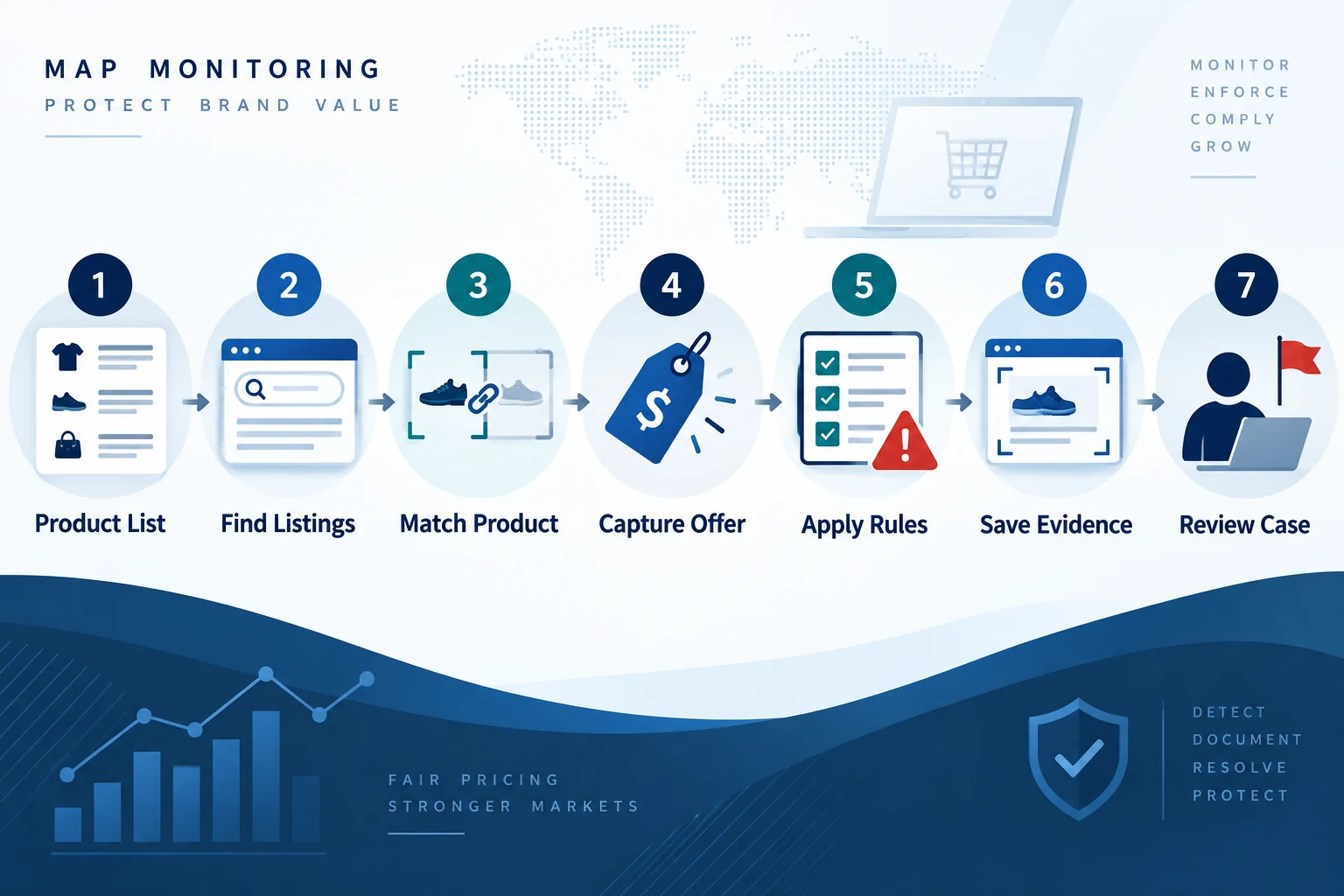
When catalogs, listings, seller records, and policy rules move between several systems, reliable data pipelines help keep the monitoring inputs current.
At a basic level, MAP monitoring sounds like a price comparison.
At scale, it is really a data-matching and compliance workflow.
Here is what typically happens.
1. Build a reliable MAP product list
Monitoring starts with the brand's own data.
For each covered product, the system may need:
- product name;
- SKU;
- UPC or GTIN;
- manufacturer part number;
- current MAP;
- effective date;
- market or currency;
- applicable exceptions.
Think of this as the monitoring program's source of truth.
If the MAP database is outdated, the alerts will also be wrong.
2. Find the sellers and listings that matter
Next, you need to know where the products appear.
That may include:
- Amazon;
- Walmart;
- eBay;
- Google Shopping;
- authorized retailer websites;
- dealer sites;
- specialty marketplaces;
- comparison-shopping pages.
Known URLs can be monitored directly.
Broader systems may also discover new listings and sellers.
That matters because unauthorized or previously unknown sellers may not appear on the brand's original retailer list.
3. Match each listing to the correct product
This is one of the most important parts of ecommerce MAP monitoring.
Imagine your catalog contains:
- 32-ounce bottle;
- 16-ounce bottle;
- two-pack;
- six-pack;
- older model;
- newer model.
A product title containing the same brand name is not enough to establish that the listing belongs to the same SKU.
Systems may use identifiers such as:
- SKU;
- UPC;
- GTIN;
- EAN;
- MPN;
- model number;
- title;
- product attributes;
- pack size;
- variant information.
Incorrect matching creates false violations.
If a system compares the price of a single unit with the MAP for a three-pack, the resulting alert is useless.
4. Capture the advertised offer
Once the correct product is identified, the monitoring system captures the advertised price and relevant offer information.
Useful fields can include:
- current advertised price;
- previous price;
- seller;
- availability;
- coupon text;
- promotional messaging;
- shipping information;
- bundle information;
- marketplace;
- timestamp;
- source URL.
More context generally makes later review easier.
5. Apply the MAP rules
The observed data is then evaluated against the current policy.
The basic logic may be:
If advertised price < MAP, flag the observation.
More advanced monitoring can consider:
- approved promotional dates;
- channel-specific thresholds;
- country-specific rules;
- coupon treatment;
- bundles;
- multipacks;
- product exceptions;
- reseller exceptions.
The closer the software's logic matches the actual MAP policy, the fewer irrelevant alerts a team has to review.
6. Save evidence
A violation discovered today may already be gone tomorrow.
Retail prices change constantly.
That is why evidence capture matters.
A monitoring record may preserve:
- screenshot;
- price;
- seller;
- product;
- URL;
- date;
- time;
- promotion text;
- historical observations.
Recent MAP-monitoring guides increasingly emphasize screenshots, timestamps and seller-level evidence because these records make violations easier to investigate and manage.
7. Review and route the case
Detection is not the end of MAP compliance monitoring.
Someone normally needs to decide:
- Is the product match correct?
- Is this actually the responsible seller?
- Was an approved promotion active?
- Does the policy cover this type of advertisement?
- Is this the seller's first occurrence?
- Has the price already been corrected?
- What should happen next under the company's process?
Good software therefore helps organize cases rather than simply generating alerts.
Why Ecommerce MAP Monitoring Becomes Difficult at Scale
Checking ten product pages once a week is relatively simple.
Monitoring thousands of product-seller combinations is not.
Several problems appear quickly.
Prices change constantly
Online sellers can update pricing throughout the day.
A violation that appears for four hours may disappear before a team performs its weekly manual check.
Monitoring frequency should therefore match the speed and importance of the channel being watched.
One product can appear in many places
A single SKU might appear on:
- a dealer's own website;
- Amazon;
- Walmart;
- eBay;
- Google Shopping;
- niche marketplaces;
- comparison-shopping engines.
Multiply that by several hundred SKUs and the number of pages becomes difficult for people to manage manually.
Seller identities change
Marketplace listings can involve multiple third-party sellers.
The seller offering the current price today may not be the same seller displaying it tomorrow.
That makes seller-level monitoring useful.
Product data is inconsistent
Retailers may rewrite titles.
Identifiers can be missing.
Pack sizes can be unclear.
One site may call a product:
X200 Pro Black
while another calls the same item:
Brand X-200 Professional Edition - Midnight
Software needs enough matching logic to determine whether those are actually the same product.
Promotions complicate the price
Coupons, bundles, quantity discounts and cart promotions introduce context.
A monitoring tool that sees only a single HTML price field can miss important information or create misleading alerts.
Manual Monitoring vs MAP Monitoring Software vs Managed Services
Brands generally have three options.
| Approach | Best suited for | Advantages | Limitations |
|---|---|---|---|
| Manual monitoring | Very small catalogs and reseller networks | Low software cost and simple to start | Slow, difficult to scale and easy to miss short-lived changes |
| MAP monitoring software | Growing brands with repeatable monitoring needs | Automated collection, alerts, history and broader coverage | Team still needs to configure, validate and manage cases |
| Managed MAP monitoring services | Brands wanting more operational support | Can combine software with human review and workflow assistance | Usually costs more and gives the brand less direct control over parts of the process |
Manual monitoring is not automatically wrong.
A manufacturer with five products and three dealers may not require enterprise software.
But the economics change when a company manages hundreds of SKUs across dozens of sellers.
At that point, repetitive checking becomes a poor use of human time.
What Good MAP Monitoring Software Should Actually Track
The phrase MAP monitoring software covers many different products.
Some are basic webpage trackers.
Others are ecommerce pricing platforms.
Others combine monitoring with managed compliance services.
Instead of choosing based on the longest feature list, evaluate the capabilities that affect the quality of the data.
Channel coverage
Start with a simple question:
Can the system monitor the places where your products are actually advertised?
A platform with excellent Amazon coverage may still be unsuitable if most of your reseller problems occur on independent dealer websites.
Identify your important channels first.
Then evaluate the software.
Accurate product matching
This is critical.
The system should reliably distinguish:
- models;
- sizes;
- colors;
- generations;
- bundles;
- pack quantities;
- accessories.
Ask how products are matched and what happens when identifiers are missing.
Seller identification
For marketplace monitoring, finding the listing is only half the job.
You often need to know who is behind the observed offer.
That is particularly useful when several sellers compete on the same product listing.
Appropriate monitoring frequency
“Real-time” sounds attractive, but not every catalog needs minute-by-minute checks.
What matters is whether monitoring occurs frequently enough for the business problem.
Fast-moving marketplace products may justify more frequent collection than stable dealer listings.
Policy-aware rules
Useful software should let the monitoring logic reflect your policy.
That may include:
- different MAP values by SKU;
- start and end dates;
- permitted promotions;
- channel exceptions;
- geographic differences;
- product exclusions.
Evidence capture
Look for records that can preserve:
- screenshot
- timestamp
- price
- seller
- product
- URL
These are far more useful than a simple email saying a price changed.
Historical data
Price history helps answer questions that a one-time screenshot cannot.
For example:
- Is this seller repeatedly advertising below MAP?
- How long did the price remain below the threshold?
- Which SKUs produce the most alerts?
- Did compliance improve after communication?
- Was one seller the first to move?
Useful alerts
Too many alerts can be almost as bad as no alerts.
A strong setup lets teams prioritize by factors such as:
- amount below MAP
- seller
- marketplace
- product importance
- recurrence
- duration
Integrations and exports
Larger teams may need violation data in:
- business intelligence tools
- CRM platforms
- internal databases
- email systems
- APIs
- spreadsheets
Do not assume every platform makes its underlying data easy to export.
MAP Monitoring vs Regular Price Monitoring
These terms are related but serve different purposes.
| MAP monitoring | Price monitoring |
|---|---|
| Starts with your MAP threshold | Starts with market or competitor prices |
| Focuses on potential policy violations | Focuses on competitive intelligence |
| Commonly used by brands and manufacturers | Commonly used by brands and retailers |
| Often requires seller and evidence records | Often emphasizes market trends and pricing decisions |
| Supports compliance workflows | Supports pricing strategy |
Suppose your product has a MAP of $100.
MAP monitoring asks:
Which monitored sellers are advertising this product below $100?
Competitive price monitoring asks:
What prices are competitors and retailers using, how are those prices changing, and what does that mean for our pricing strategy?
The same underlying pricing data may support both jobs, but the business questions are different.
What MAP Compliance Monitoring Can Help a Brand Understand
MAP monitoring is often described only as violation detection.
The collected data can provide a broader view of the distribution channel.
Which products create the most issues?
If 80% of alerts come from five SKUs, the problem may be concentrated rather than catalog-wide.
Which sellers repeatedly appear?
One isolated observation is different from a repeating pattern.
Historical monitoring makes that distinction visible.
Where do issues appear first?
A lower advertised price may appear first on a dealer website and later become visible through shopping engines or marketplaces.
Historical timestamps can help teams reconstruct the sequence.
How quickly are problems discovered?
A monitoring program should reduce the gap between a price appearing and the brand becoming aware of it.
That does not mean every issue requires immediate action.
It means teams have the information needed to make that decision.
How to Build a Practical MAP Monitoring Process
You do not need to monitor every possible product on day one.
A focused rollout is often more useful.
Start with important products
Prioritize products with:
- high sales volume;
- many resellers;
- frequent discounting;
- strong marketplace visibility;
- important brand positioning.
This gives the team a manageable dataset while the process is being tested.
Clean your product information
Prepare a reliable table containing:
- SKU
- product name
- identifier
- MAP
- effective date
- known sellers
- known URLs
Bad input data creates bad monitoring results.
Define what needs to be monitored
Decide whether your scope includes:
- Amazon
- Walmart
- eBay
- Google Shopping
- authorized dealer sites
- unauthorized sellers
- comparison engines
- specific geographic markets
Do not pay to monitor irrelevant channels simply because a platform supports them.
Define your policy logic
Document how the monitoring process should treat:
- coupons
- bundles
- clearance periods
- temporary promotions
- discontinued items
- new product launches
The software configuration should follow the policy rather than inventing policy rules of its own.
Validate early results
Do not automatically trust every alert produced during onboarding.
Check a sample manually.
Look for:
- incorrect SKUs
- wrong pack sizes
- stale pages
- incorrect seller attribution
- expired promotions
- currency issues
Fix these problems before scaling.
Create a review workflow
Decide who reviews potential violations and what information they need.
A simple workflow might use statuses such as:
New → Under Review → Validated → Communication Sent → Resolved → Closed
The exact workflow depends on the organization.
Consistency matters more than complexity.
Common MAP Monitoring Mistakes
MAP monitoring can generate plenty of data without producing useful insight if it is configured poorly.
Treating every low price as a confirmed violation
A detected price is an observation.
It still needs to be interpreted against the policy.
Using weak product matching
False matches destroy trust in the monitoring system.
If a team repeatedly receives alerts for the wrong variants, it will eventually stop paying attention.
Monitoring only known sellers
Known authorized sellers matter, but new marketplace sellers can appear.
Brands concerned about broader channel visibility may need seller discovery as well as URL monitoring.
Saving no evidence
A price-change notification without seller, timestamp, URL or screenshot provides little context later.
Checking too infrequently
Weekly monitoring can miss temporary promotions or short-lived price changes.
The appropriate frequency depends on the market, catalog and risk.
Using outdated MAP values
A perfectly functioning monitoring system will still produce incorrect alerts if the source-of-truth MAP file is outdated.
Ignoring exceptions
Approved promotions should not generate the same workflow as genuine policy concerns.
MAP Monitoring Metrics Worth Tracking
Collecting thousands of observations is not the same as running a useful monitoring program.
Track metrics that help you understand what is actually happening.
Compliance rate
What percentage of monitored observations meet the applicable MAP threshold?
Track the trend over time rather than relying only on a single-day number.
Number of potential violations
How many below-threshold observations were detected?
Separate raw alerts from validated cases when possible.
Repeat occurrences
Which sellers or products appear repeatedly?
Repeated patterns may deserve different operational attention from isolated events.
Time to detection
How much time passes between an observed change and the monitoring system detecting it?
Time to resolution
Once a case is validated, how long does it remain open?
Products affected
What percentage of MAP-covered SKUs generate issues?
This can reveal whether the problem is broad or concentrated around a small group of products.
A Practical MAP Monitoring Standard
A useful MAP monitoring program does not treat every low number as a proven violation. It maintains current product and policy data, matches the right seller and offer, saves reviewable evidence, and routes potential issues to a trained person. The software improves coverage and consistency, while the final decision follows the policy, the facts, and appropriate legal review.