
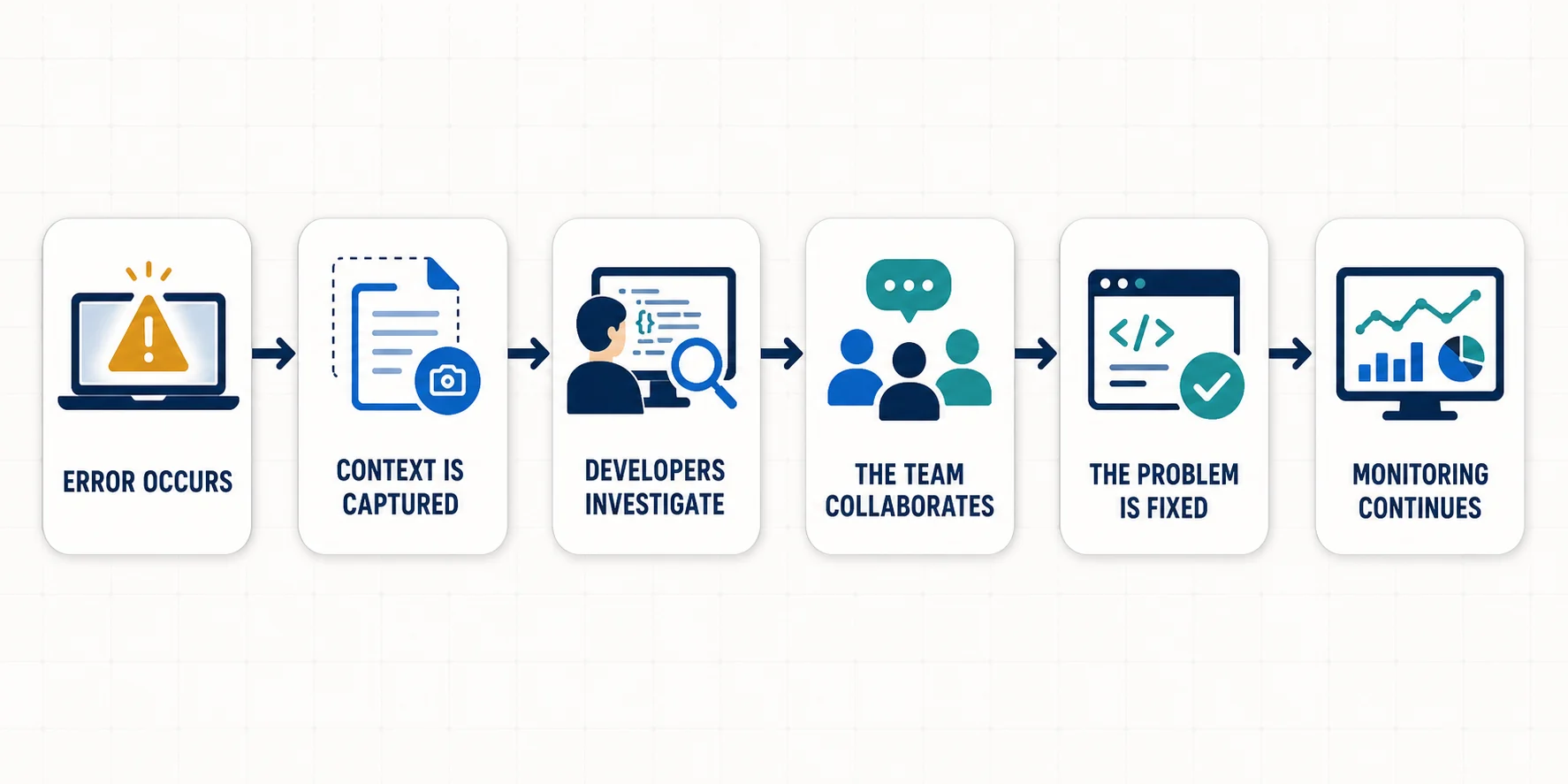
A software bug is often easy to notice but difficult to explain. A customer may say, “The page stopped working,” while the developer sees a perfectly normal application on their own computer. The real challenge is finding out what happened immediately before the failure: which action the user took, what request failed, what the browser reported, and what environment the application was running in. That is the problem EndBugFlow says it is designed to address. So, how does EndBugFlow software work? Based on EndBugFlow's own published explanation, the software captures information around an application error, keeps that information together, makes it easier for developers to investigate the problem, allows the context to be shared with the team, and monitors application behavior for unusual patterns. The basic idea can be summarized like this:
Error occurs → context is captured → developers investigate → the team collaborates → the problem is fixed → monitoring continues.
That sounds simple, but each part solves a common problem in software development.
What Is EndBugFlow Software?
EndBugFlow describes itself around the idea of end-to-end debugging and workflow optimization. Its public material focuses on helping developers identify, understand, and resolve software problems with more context than they would get from a basic error message alone. This distinction matters because bug tracking and debugging are not exactly the same thing.
A traditional bug tracker primarily organizes work. It may record:
- what the problem is,
- who owns it,
- its priority,
- its current status,
- and whether it has been resolved.
Debugging goes one step deeper.
It asks: Why did the problem happen?
EndBugFlow's first-party description suggests that the platform combines elements of debugging, application monitoring, collaboration, and issue-management workflows rather than functioning only as a list of bug tickets.
How Does EndBugFlow Software Work?
The easiest way to understand the software is to follow one bug from the moment something goes wrong.
1. An Error Happens
Imagine a customer is completing a checkout form.
They enter their details, click Place Order, and the page suddenly returns an error.
With a manual reporting system, the customer might send a screenshot. QA might then attempt to reproduce the failure. A developer may inspect logs and ask several questions:
- Which browser were you using?
- Which button did you click?
- Did the API respond?
- Was there a JavaScript error?
- Did this happen before or after validation?
- Can you make it happen again?
Sometimes the bug disappears during testing.
That makes troubleshooting difficult.
EndBugFlow's approach is designed to capture more of this context when the failure happens.
2. EndBugFlow Captures the Error Context
According to the official EndBugFlow explanation, the capture process can include information such as:
- console logs and error information,
- network activity,
- user interactions,
- browser information,
- operating system details,
- screen or device information.
Instead of seeing only:
“Checkout failed.”
the developer may have a clearer trail showing what happened around the failure.
For example:
Customer clicks Place Order → browser sends request → API request fails → console records an error → checkout stops.
That sequence provides much more useful starting information than a screenshot alone.
3. The Developer Gets More Than an Error Message
A stack trace or error code can tell a developer where an application failed, but it does not always explain everything that happened before the failure.
Context fills that gap. Suppose an API request timed out. The visible error might appear in the checkout interface, even though the actual problem occurred in a service running elsewhere.
Seeing the surrounding request and application activity helps the developer ask a more useful question:
“What caused this error?”
instead of simply:
“Where did this error appear?”
EndBugFlow describes this contextual capture as one of the central parts of its debugging approach.
4. The Issue Can Be Shared With the Team
Software bugs are rarely handled by one person from beginning to end.
A typical issue may involve:
- a customer or user,
- customer support,
- QA,
- a frontend developer,
- a backend developer,
- DevOps,
- and an engineering manager.
Important information can easily become scattered across screenshots, chat messages, emails, tickets, and log files. EndBugFlow says its workflow allows captured debugging information to be shared with other team members through a common report or link so that they can inspect the same context. The practical goal is simple: reduce the amount of back-and-forth required to explain a bug.
Instead of:
“Can you send me the console log?”
followed by:
“Which request failed?”
followed by:
“What browser did this happen in?”
the relevant context can potentially travel with the issue.
5. Existing Development Tools Receive the Context
A debugging tool becomes much less useful if developers must abandon all of their existing systems to use it. EndBugFlow's own article specifically describes integrations with Jira, Slack, and GitHub.
It says Jira can be used for ticket creation, Slack for notifications, and GitHub for connecting errors with relevant code or commits. That means the intended workflow is not necessarily:
Stop using everything else and move all work into EndBugFlow.
It is closer to: Capture better debugging information and move that information into tools the team already uses. That distinction is useful for teams already working with established development processes.
6. Developers Investigate and Fix the Cause
EndBugFlow does not remove the need for software engineering.
Developers still need to:
- understand the code,
- determine the real root cause,
- decide how the problem should be fixed,
- test the change,
- review possible side effects,
- and confirm that the fix works.
What the software is intended to improve is the information available at the beginning of that process. Better information can reduce time spent trying to recreate a problem or hunting through unrelated logs.
Consider our checkout example again.
Without context:
“Checkout does not work.”
With context:
“Checkout failed immediately after this API request returned an error in this browser after these user actions.”
The second description gives an engineer a much better starting point.
7. Monitoring Continues After the Immediate Error
EndBugFlow also describes a proactive monitoring layer rather than limiting its role to errors that have already caused a visible crash. Its first-party article says the platform can observe areas such as network behavior, response times, and memory usage and look for deviations from normal application behavior. That introduces a second type of problem detection.
Reactive debugging
Something breaks.
The team investigates it.
Proactive monitoring
Something begins behaving unusually. The team sees the warning before the issue becomes more serious. For example, an application does not need to crash for something to be wrong. A database request that used to take a fraction of a second could gradually become slower. Memory usage might continue climbing. An API endpoint might suddenly start producing more errors than usual. Monitoring these patterns can help engineering teams investigate problems before they become larger incidents.
The Three Core Parts of the EndBugFlow Workflow
EndBugFlow's own explanation groups its approach into three major areas.
Automated Error Capture
This is the information-gathering stage.
The goal is to preserve useful context when something goes wrong rather than relying entirely on someone to manually reconstruct the problem later.
Possible context described by EndBugFlow includes console activity, network information, user interactions, and environment details.
Collaborative Resolution
Captured information is more useful when everyone investigating the problem can access the same context. The collaboration layer is intended to help developers, testers, and other team members work from the same evidence rather than exchanging incomplete descriptions.
Integrations can then connect that workflow with systems such as Jira, Slack, and GitHub.
Proactive Monitoring
The third layer looks beyond individual error reports.
EndBugFlow describes monitoring normal application activity and identifying unusual changes in areas such as response times, network activity, and memory usage.
Together, these three areas create a broader workflow:
capture what happened → understand it together → watch for what may happen next.
What Information Can EndBugFlow Capture?
According to its public explanation, several categories of context can be associated with an error.
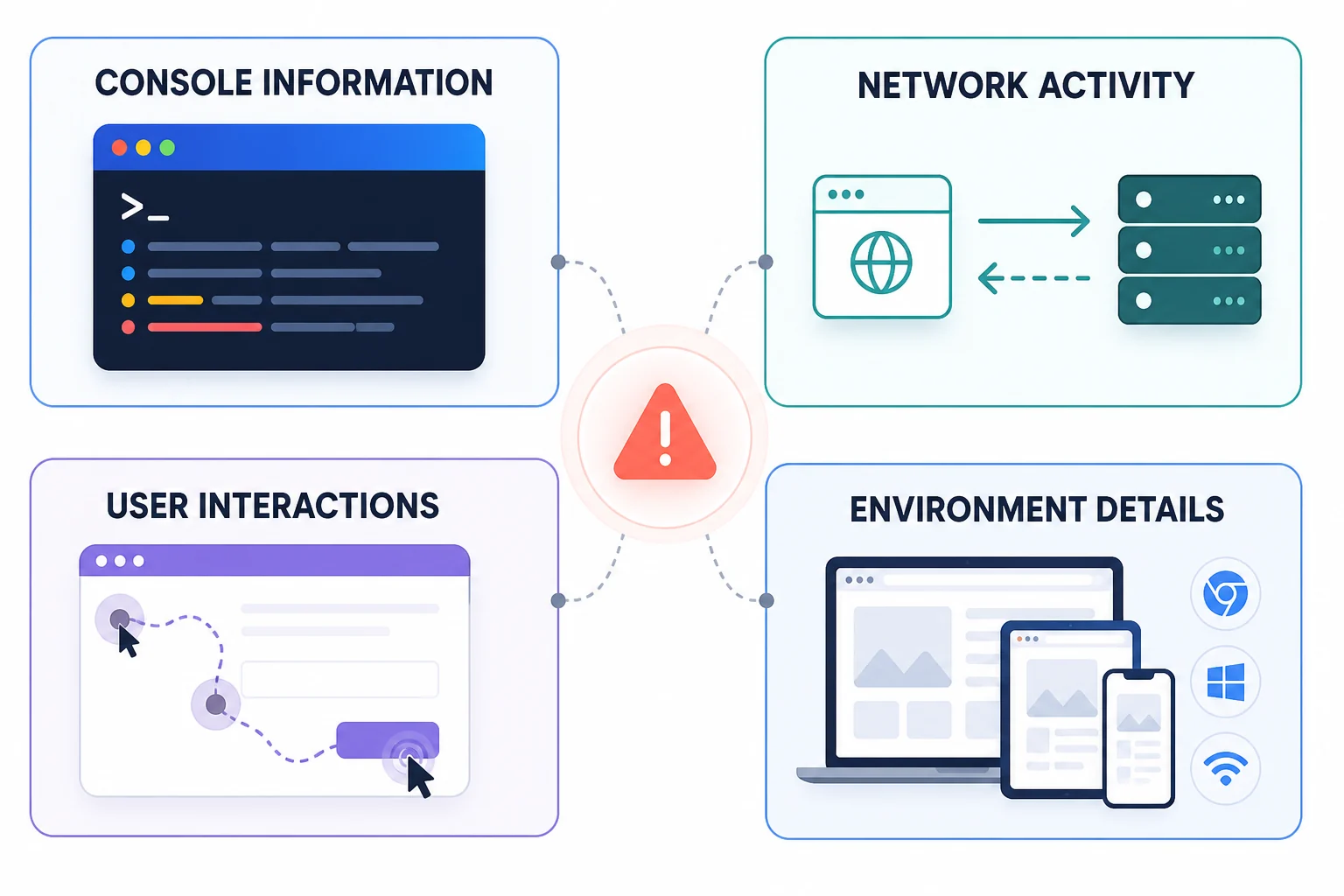
Console Information
Browser or application console output can contain warnings, exceptions, and stack information.
This can help developers identify where an error surfaced.
Network Activity
Many modern applications depend heavily on APIs.
A button may appear broken even though the real cause is a failed request to another service.
Network information can therefore help identify:
- failed requests,
- unexpected responses,
- slow endpoints,
- and communication problems.
User Interactions
The actions immediately before an error can be extremely useful.
Knowing that a user:
- opened a page,
- selected an option,
- submitted a form,
- and then received an error
is much more useful than knowing only that “the page crashed.”
Environment Details
A bug may happen only in:
- one browser,
- one operating system,
- one screen size,
- or one device type.
Environment information can help developers identify those differences.
How EndBugFlow Fits Into the Software Development Lifecycle
EndBugFlow's first-party article describes use across development, staging/QA, and production.
During Development
Developers can investigate errors while building features.
Finding a problem here is usually preferable because the code has not yet reached users.
During Staging and QA
QA testers often discover bugs that developers did not encounter locally.
Detailed context can improve bug reports and reduce the familiar cycle:
QA reports bug → developer cannot reproduce it → QA explains again → developer asks for logs → testing repeats.
In Production
Production is where the application meets real users, devices, traffic patterns, and edge cases.
Monitoring and contextual error information can help engineering teams understand failures that occur only under real-world conditions. Data engineering teams need the same discipline when improving ETL reliability.
EndBugFlow vs. Traditional Bug Tracking
The difference is easiest to understand through a simple example.
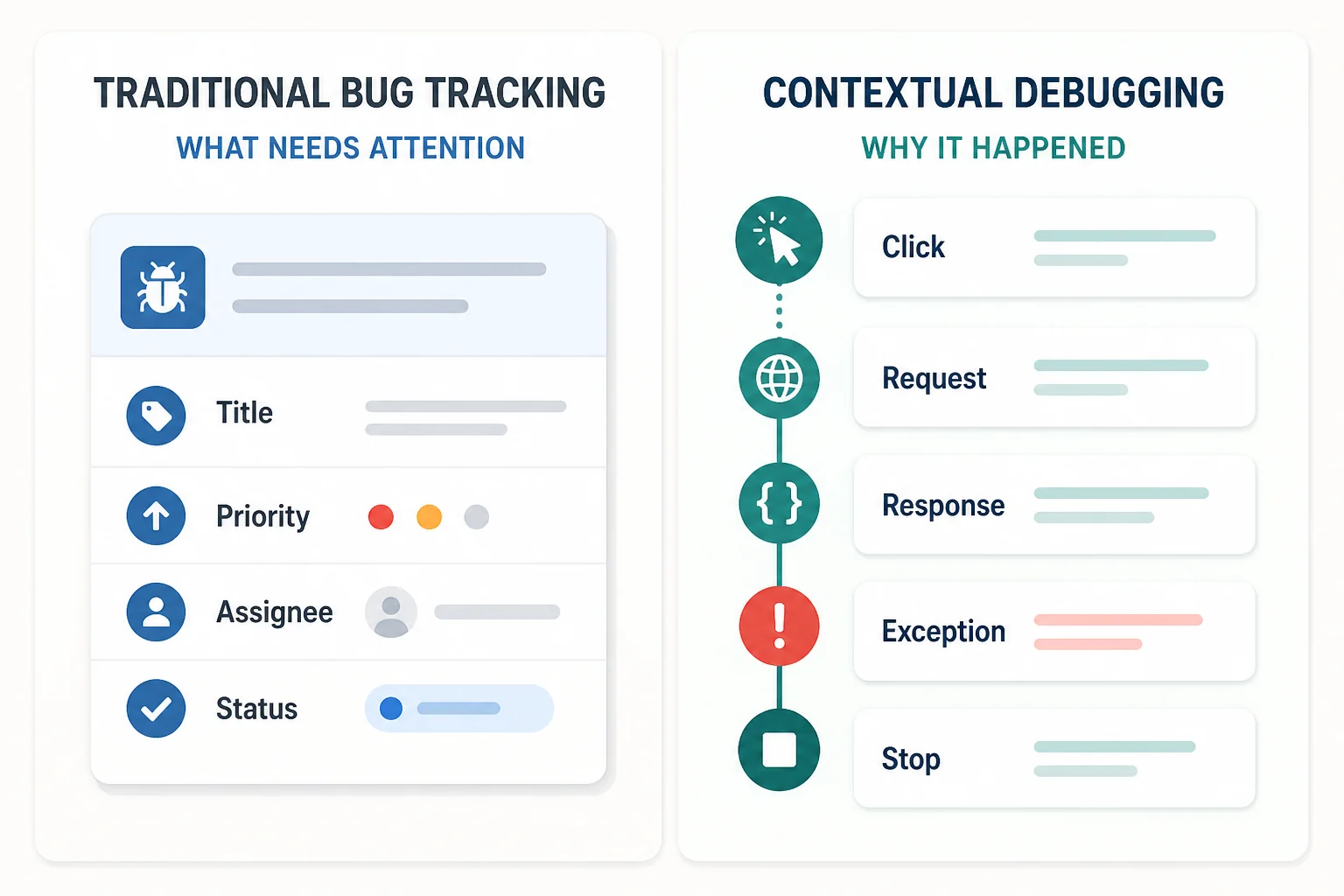
A traditional bug ticket might say:
Title: Payment button fails
Priority: High
Assigned to: Backend team
Status: Open
That information is useful for managing the work. But a developer still needs to discover why the payment failed. A debugging-oriented workflow adds technical evidence:
Payment button clicked → request sent → payment API returns an unexpected response → JavaScript exception occurs → transaction stops.
That evidence helps diagnose the cause.
In practice, development teams often need both functions:
issue management tells the team what needs attention; debugging context helps the team understand why it happened. Several ranking articles describe EndBugFlow largely as a bug-tracking system, while its own explanation places considerably more emphasis on contextual debugging and monitoring.
What EndBugFlow Appears to Integrate With
The clearest integrations mentioned in EndBugFlow's first-party article are Jira, Slack, and GitHub.
Jira
Bug information can be associated with the ticketing workflow so teams can manage investigation and resolution alongside other development tasks.
Slack
Alerts can help teams become aware of important errors without repeatedly checking another dashboard.
GitHub
Connecting error information with code changes can help developers move more quickly from a symptom to the relevant part of the codebase.
Some third-party articles list additional integrations such as GitLab and Jenkins, but these should be independently verified rather than assumed from secondary pages alone.
What EndBugFlow Does Not Eliminate
Automation can improve debugging, but it does not replace the people responsible for software quality. Developers still need to interpret evidence. QA teams still need to verify important fixes. Code still needs testing. A captured sequence of events can show what happened, but determining the correct solution may require knowledge of architecture, business logic, security, performance, and possible side effects.
Features You Should Verify Before Depending on EndBugFlow
There is an important distinction between understanding the concept and choosing software for a real development environment. The EndBugFlow website currently contains first-party descriptions of its debugging approach and numerous technical articles. However, the public material reviewed for this article does not provide the same level of conventional product documentation commonly expected when evaluating mature engineering platforms. Before connecting sensitive production systems, a technical team should therefore verify details such as:
- exact supported programming languages and frameworks,
- supported browsers and platforms,
- installation and deployment requirements,
- cloud versus self-hosted availability,
- data storage location,
- source-code access requirements,
- data retention rules,
- permissions and access controls,
- encryption and security practices,
- available integrations,
- API and webhook documentation,
- pricing,
- support options,
- performance overhead,
- and how sensitive user information is handled.
This is especially important for a debugging system because error reports can potentially contain technical or user-related information.
Who Could Benefit From This Type of Workflow?
Developers
Developers benefit when a bug arrives with enough context to begin investigation quickly instead of spending time recreating the environment.
QA Teams
QA testers can provide stronger reports when technical context accompanies the issue.
Engineering Managers
Better visibility into recurring problems can help engineering leaders identify areas of an application that need attention.
DevOps and Reliability Teams
Monitoring unusual application behavior can complement existing efforts to identify production problems before they become larger incidents.