


Your email platform says 10,000 messages were delivered. But “delivered” does not necessarily mean those 10,000 emails appeared where recipients were likely to see them.
Some may be sitting in spam. Others may have reached a secondary tab. A particular provider may have filtered nearly all of them while another accepted them into the inbox.
That is exactly why an email deliverability test exists.
An email deliverability test checks where your messages are likely to land and helps diagnose the technical, reputation, list, or content problems that prevent them from reaching the inbox.
A strong test does more than produce a spam score.
It combines real inbox-placement testing with authentication, sender-reputation, content, and list-health checks.
Here is how it works.
What Is an Email Deliverability Test?
An email deliverability test evaluates whether a message sent from your real email infrastructure reaches the intended mailbox successfully and, ideally, appears in a useful inbox location rather than spam or being blocked.
A typical test can investigate:
- Where the message landed
- Whether SPF passed
- Whether DKIM passed
- Whether DMARC aligned
- Whether the sending IP or domain has reputation problems
- Whether the message contains suspicious formatting or links
- Whether the sending list itself may be damaging performance
The most important part is inbox placement.
Technical checks explain possible causes.
Placement tells you what actually happened.
Email Delivery vs Email Deliverability
These terms are commonly confused.
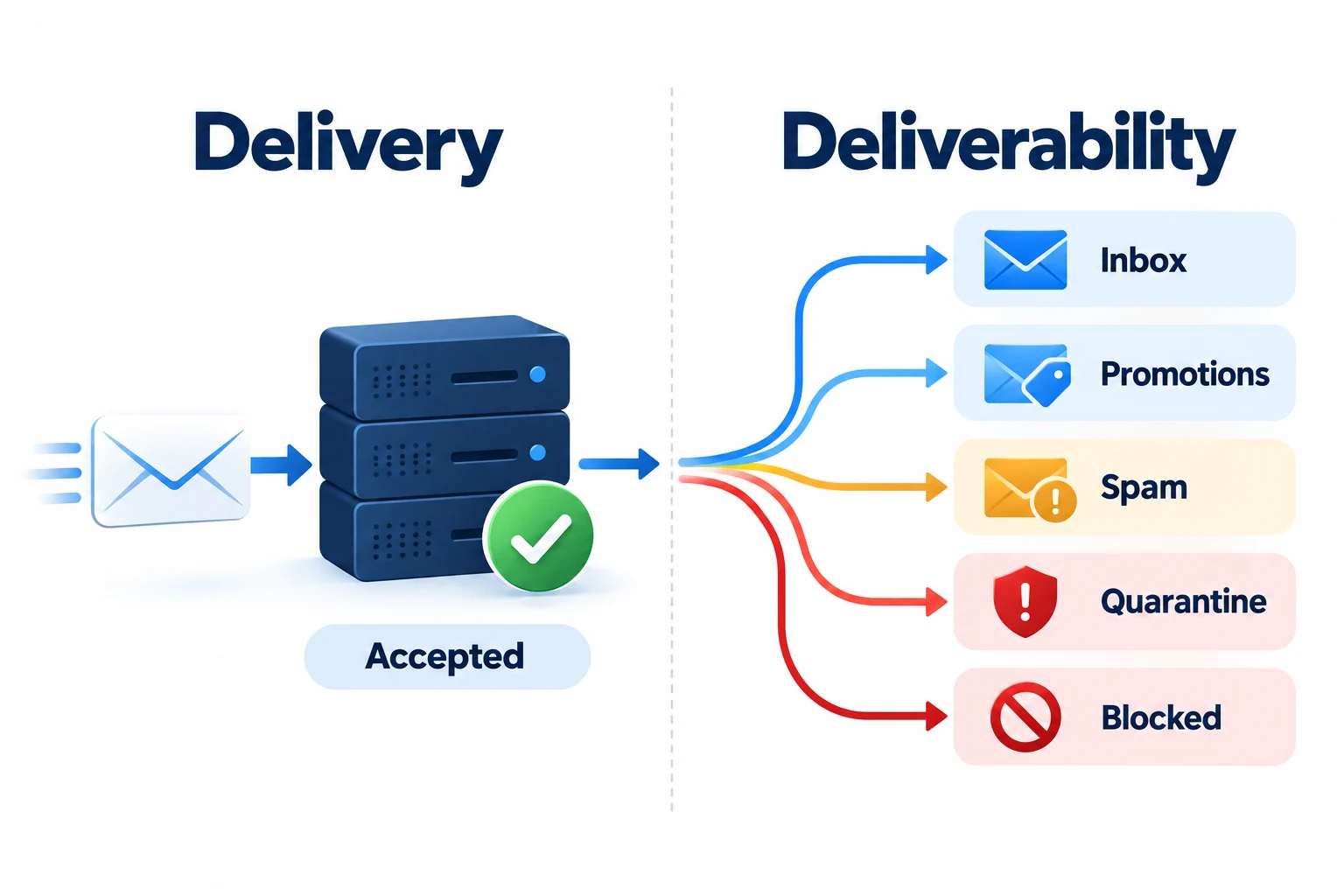
Email delivery
Delivery means the receiving mail system accepts the email rather than rejecting or bouncing it.
Email deliverability
Deliverability is concerned with what happens after acceptance.
The message might reach:
- Primary inbox
- Promotions or another organized tab
- Spam/junk
- Quarantine
- Another filtered folder
That means you can have a strong delivery rate while still having an inbox-placement problem.
Several current deliverability guides make this distinction central to their testing process.
A simple way to remember it is:
Delivery asks: “Did the mail server accept it?”
Deliverability asks: “Where did the message actually end up?”
The 5 Parts of a Complete Email Deliverability Test
No single score explains everything.
A useful test combines several kinds of evidence.
| Test area | Question it answers |
|---|---|
| Inbox placement | Where did the email actually land? |
| Authentication | Can providers verify the sender? |
| Reputation | Does the sending identity have trust problems? |
| Content/format | Does the message contain avoidable filtering signals? |
| List quality | Are you sending to people and addresses that support healthy reputation? |
Let's look at each one.
1. Inbox Placement
Inbox-placement testing - sometimes called seed testing - is the closest thing to directly measuring deliverability before a real campaign.
A testing platform gives you controlled addresses at mailbox providers such as:
- Gmail
- Google Workspace
- Outlook
- Microsoft 365
- Yahoo
You send the real message to those addresses.
The test then reports where each copy landed.
For example:
Gmail → Inbox
Google Workspace → Inbox
Outlook → Spam
Microsoft 365 → Inbox
Yahoo → Spam
This immediately reveals something that a normal “delivery rate” cannot:
The problem is provider-specific.
AWS's own inbox-placement reporting similarly separates inbox, spam, and missing messages by provider.
2. SPF, DKIM, and DMARC
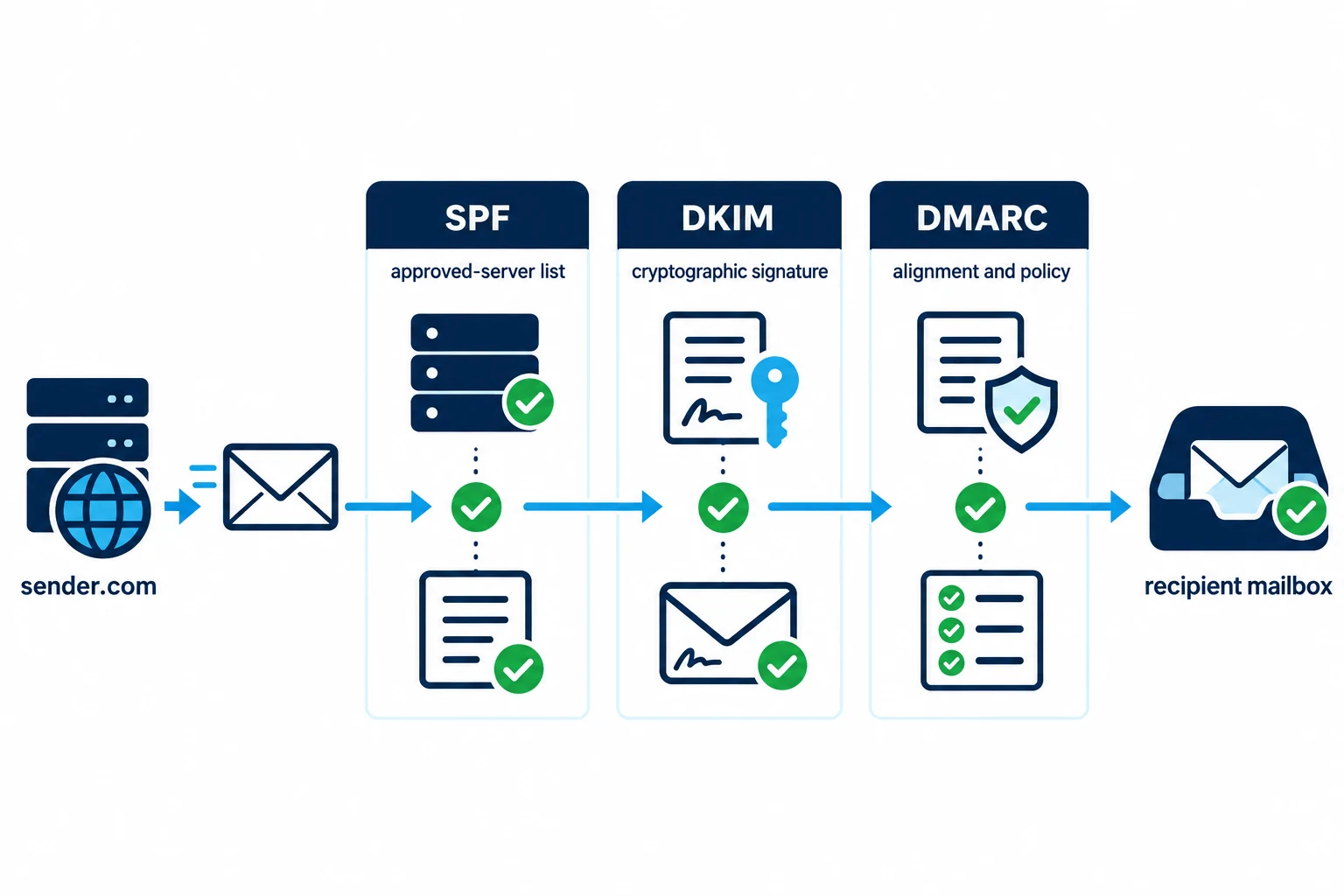
Authentication proves that a sender is authorized to use a domain.
Three technologies matter most.
SPF
SPF identifies which servers are allowed to send email for a domain.
DKIM
DKIM adds a cryptographic signature that allows receiving systems to verify that an authorized sender signed the message and that relevant signed content was not altered in transit.
DMARC
DMARC builds on SPF and DKIM and allows domain owners to define a policy for messages that fail authentication. It also checks alignment between the visible From domain and authenticated domains.
These are no longer optional technical niceties for serious bulk senders.
Google currently requires SPF or DKIM from all senders to Gmail, while senders sending more than 5,000 messages per day to personal Gmail accounts must use SPF, DKIM, and DMARC.
Yahoo imposes similar authentication requirements on bulk senders.
3. Domain and IP Reputation
Authentication answers:
Is this sender technically authorized?
Reputation asks:
Does the mailbox provider trust the sending history?
Providers may consider signals related to:
- Spam complaints
- Sending history
- Volume patterns
- Bounce behavior
- Recipient engagement
- Shared IP activity
Google Postmaster Tools can provide Gmail-related information about spam rates, authentication, and domain/IP reputation for qualifying senders.
This is why a perfectly authenticated email can still land in spam.
Authentication is necessary.
It is not the whole deliverability system.
4. Content and Formatting
Content testing examines the message itself.
A test may inspect:
- Subject line
- HTML structure
- Broken links
- Redirects
- Images
- Headers
- Unsubscribe functionality
- Suspicious URLs
- Message formatting
But avoid thinking in terms of a magical list of forbidden “spam words.”
Modern filtering is more complex.
Mailchimp notes that reputation and engagement generally matter more than individual words, although patterns such as excessive capitalization or misleading promotional language can still contribute to problems.
Content testing is therefore useful as one diagnostic layer - not as a guarantee of inbox placement.
5. List Quality and Recipient Behavior
A perfect message sent to a poor-quality list can still damage deliverability.
List problems may include:
- Invalid addresses
- Old contacts
- Unengaged recipients
- Purchased contacts
- Spam traps
- Bot-generated signups
- People who never wanted the messages
Google advises senders to send subscription email only to people who want to receive it because unwanted messages create spam reports that can damage reputation.
Mailchimp likewise identifies invalid addresses, complaints, stale subscribers, and poor permission practices as reputation risks.
This is why list health belongs in a complete deliverability diagnosis.
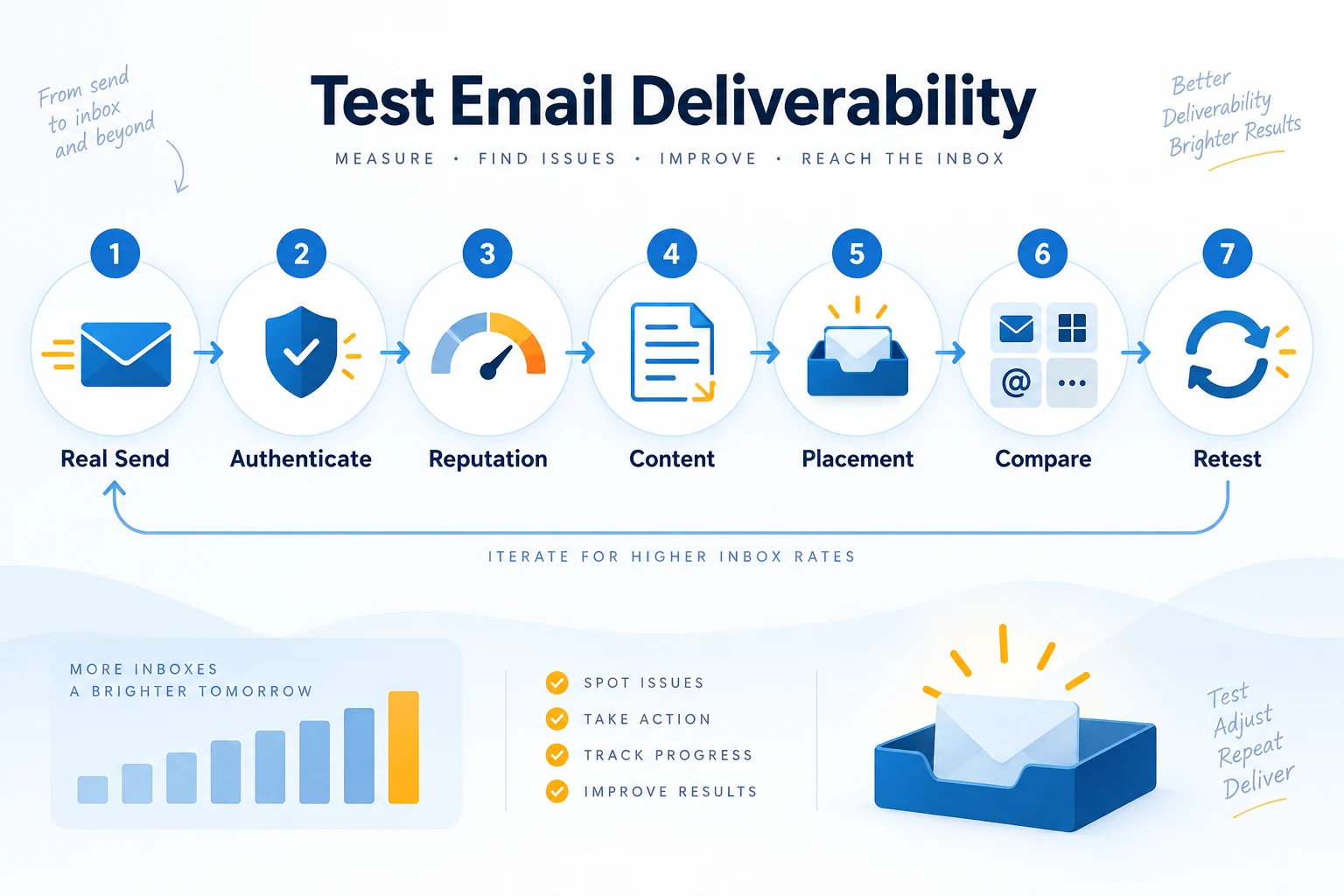
How to Test Email Deliverability Step by Step
Now we can answer the practical question:
How to test email deliverability properly?
Follow this sequence.
Step 1: Test the Real Email Through the Real Sending Path
This is one of the most important steps - and one of the easiest to get wrong.
Suppose your actual campaign includes:
- Marketing platform
- Custom tracking domain
- HTML template
- Five links
- Personalization
- Images
- Unsubscribe headers
But your test is a plain-text message manually sent from your personal mailbox.
You did not really test the campaign.
You tested something else.
MailReach strongly recommends keeping tests as close as possible to real sending conditions, including the sending service, actual content, and personalization.
For a representative test, use the same:
- Sending platform
- Sending domain
- From address
- Subject line
- Body
- HTML
- Links
- Tracking configuration
- Images
- Personalization settings
The closer the test is to production, the more useful the result becomes.
Step 2: Verify SPF, DKIM, and DMARC
Check your sending domain before obsessing over subject-line wording.
Verify:
SPF: Does the sending infrastructure appear in the permitted SPF configuration?
DKIM: Is the message being signed correctly?
DMARC: Does the message pass the expected alignment?
If authentication is broken, fix it first.
Google says unauthenticated messages may be marked as spam or rejected.
Also make sure all legitimate services that send on behalf of your domain are accounted for.
For example, a company might send email through:
- Google Workspace
- CRM
- Newsletter platform
- Help desk
- Transactional-email provider
Authentication needs to work across the actual sending environment.
Step 3: Check Sender Reputation and Blocklists
Next, investigate the identity behind the message.
Check:
- Domain reputation
- Sending IP reputation
- Major blocklists
- Recent spam complaints
- Sudden volume changes
For Gmail traffic, Google Postmaster Tools is particularly useful because it provides signals from Google's own ecosystem.
A blocklist result also needs context.
Do not simply request removal and assume the problem is solved.
Ask why the listing occurred.
Potential root causes include:
- Compromised account
- Poor recipient list
- Malware
- Unwanted bulk sending
- High complaint rates
Fix the cause before concentrating on delisting.
Step 4: Run a Content or Spam Test
Now test the message itself.
Tools in this category typically receive one test email and inspect:
- Authentication
- Headers
- Spam-filter signals
- URLs
- Message formatting
- Blocklist information
This gives you useful diagnostic feedback.
But remember:
A strong spam score does not guarantee good inbox placement.
MailReach explicitly notes that a message can perform well in a scoring tool and still land in spam because the score is not directly measuring placement.
Think of a spam score as a technical preflight check.
Useful?
Yes.
Proof that the campaign will hit the inbox?
No.
Step 5: Run an Inbox-Placement Test
Now measure the outcome directly.
Send the real campaign through a seed-list or placement-testing system.
Look for:
- Inbox percentage
- Spam percentage
- Missing percentage
- Provider-by-provider placement
- Authentication results
Do not focus only on one combined number.
Provider-level differences often reveal the actual problem.
For example:
Google Workspace → 95% inbox
Gmail → 88% inbox
Microsoft 365 → 52% inbox
Yahoo → 91% inbox
That result suggests a Microsoft-specific issue rather than a universal failure.
A global score could hide that distinction.
Step 6: Compare Providers That Your Audience Actually Uses
Not every audience has the same mailbox mix.
A consumer ecommerce list may contain many Gmail and Yahoo addresses.
A B2B audience may rely heavily on:
- Google Workspace
- Microsoft 365
- Corporate filtering systems
Your test should reflect your real recipient population.
MailReach makes this point directly: results are more useful when the tested providers match the providers your recipients actually use.
Do not celebrate excellent Yahoo placement if almost every real recipient uses Microsoft 365.
Step 7: Fix One Major Problem and Retest
Avoid changing everything at once.
Suppose you simultaneously:
- Change the subject
- Remove links
- Change sending IP
- Fix DKIM
- Change sending platform
- Remove tracking
The next test improves dramatically.
What fixed it?
You do not know.
Start with the highest-impact issue.
A sensible order is:
- Authentication and infrastructure
- Permission/list-quality problems
- Reputation and complaint problems
- Provider-specific placement issues
- Content or formatting issues
- Minor optimization
Then run the same test again.
How to Read Email Deliverability Test Results
A result is useful only when you know what it means.
Inbox
This is generally the desired outcome.
But remember that a seed test is still a controlled sample.
Real recipients have individual histories and engagement patterns that can influence filtering.
Promotions or Another Tab
A secondary inbox tab is not the same thing as spam.
Mailchimp specifically notes that Gmail's Promotions tab is part of the inbox rather than the junk folder.
A promotional marketing email appearing there may be behaving exactly as the mailbox provider intended.
Do not automatically try to “hack” your way into Primary.
Focus on avoiding spam and sending relevant email people actually want.
Spam
If several providers send the message to spam, investigate:
- Authentication
- Reputation
- Complaint history
- Permission/list quality
- Links
- Tracking domain
- Message formatting
- Sending volume
If only one provider shows poor placement, investigate provider-specific reputation and filtering.
Missing or Blocked
A missing message deserves urgent attention.
Possible causes include:
- Rejection
- Infrastructure problem
- DNS issue
- Authentication failure
- Sending restriction
- Recipient-server policy
- Rate limiting
Inspect SMTP responses and sending logs alongside the placement test.
Authentication Failure
Do not treat a red SPF, DKIM, or DMARC result as a cosmetic warning.
For modern bulk email, authentication has become a baseline requirement.
Fix authentication before attempting minor copy changes.
What a Good Deliverability Test Does Not Prove
Deliverability tests are valuable, but they have limits.
A Perfect Spam Score Does Not Guarantee the Inbox
A scoring tool may confirm that:
- SPF passes
- DKIM passes
- HTML is clean
- No obvious blocklist appears
- Content looks reasonable
But the provider may still make a different decision based on reputation and recipient-level signals.
That is why placement testing matters.
One Seed Test Is a Snapshot
Sender reputation changes.
Lists change.
Sending volume changes.
Templates change.
Providers update filtering.
A test performed six months ago does not describe today's environment.
Seed Addresses Are Not Real Subscribers
Your actual recipients may have:
- Opened previous emails
- Ignored previous emails
- Replied
- Marked messages as spam
- Added you to contacts
Those historical signals cannot always be reproduced perfectly in a seed environment.
Use seed testing as a controlled diagnostic - not a promise that every real recipient will see identical placement.
Current Gmail and Yahoo Requirements You Should Check
A modern deliverability test should reflect current mailbox-provider rules.
Gmail
Google currently requires all senders to Gmail accounts to use SPF or DKIM, valid forward and reverse DNS, TLS, and RFC-compliant message formatting.
Senders sending more than 5,000 messages per day to personal Gmail accounts have additional requirements, including:
- SPF
- DKIM
- DMARC
- Domain alignment
- One-click unsubscribe for applicable marketing/subscribed messages
- Visible unsubscribe functionality
Google recommends keeping Postmaster Tools spam rates below 0.1% and avoiding 0.3% or higher.
Google also says enforcement against noncompliant traffic began increasing in November 2025.
Yahoo
Yahoo also requires bulk senders to:
- Authenticate with SPF and DKIM
- Publish a DMARC policy
- Support easy unsubscribe
- Maintain valid DNS
- Follow email RFC standards
- Keep spam complaint rates below 0.3%
These checks should be part of your deliverability audit, not an afterthought.
Why List Quality Can Ruin Good Technical Results
Suppose your domain passes every authentication check.
Your HTML is clean.
Your seed test initially performs well.
Then you send to 100,000 addresses containing thousands of people who never asked to hear from you.
Technical perfection will not protect you forever.
Recipients can:
- Ignore messages
- Delete them
- Unsubscribe
- Report spam
Those signals affect your sending reputation.
Mailchimp notes that spam complaints, inactive subscribers, purchased lists, and invalid contacts can contribute to reputation problems.
Therefore, a deliverability audit should ask:
- How were these contacts acquired?
- Are they still active?
- Are bounced addresses suppressed?
- Are unsubscribes honored?
- Are suspicious signups removed?
Can Email Signup Spam Hurt Deliverability?
Yes, especially if bot-generated signups end up receiving campaigns.
An unprotected signup form can attract automated submissions.
These fake signups can:
- Pollute audience data
- Add invalid addresses
- Create bounces
- Distort campaign analytics
- Increase the chance of mailing unwanted addresses
Mailchimp describes spambots as automated systems capable of finding and submitting signup forms. It uses defenses such as reCAPTCHA and hidden honeypot fields to reduce fraudulent signups.
Useful defenses include:
- CAPTCHA or bot protection
- Honeypot fields
- Rate limiting
- Email validation
- Double opt-in where appropriate
- Monitoring sudden signup spikes
Mailchimp notes that double opt-in can help keep invalid addresses out of an audience and confirm subscriber interest.
A deliverability test should therefore be accompanied by healthy list-acquisition practices.
Behavioral Email Marketing and Deliverability
Reviewing competitor emails can reveal common journey patterns, but your own sending permission, relevance, and recipient behavior determine deliverability.
Behavioral email marketing sends or personalizes messages based on user actions.
Examples include:
- Abandoned-cart emails
- Product recommendations
- Renewal reminders
- Onboarding messages
- Re-engagement campaigns
Behavioral targeting can help deliverability indirectly because relevant messages are more likely to match what recipients expect.
But behavioral targeting does not replace the fundamentals.
A beautifully personalized email can still fail if:
- DKIM is broken
- The domain has poor reputation
- The recipient never consented
- The message is sent from problematic infrastructure
Think of behavioral email marketing as a relevance strategy, not an authentication or inbox-placement technique.
Small Details: Capitalization, Subject Lines, Email Size, and Formatting
Several small email questions frequently appear alongside deliverability searches.
They deserve clear answers.
Do Capital Letters Matter in an Email Address?
Technically, email standards contain an important distinction.
The domain part is case-insensitive.
So:
example.com
EXAMPLE.COM
Example.com
refer to the same domain.
The mailbox's local part - the part before @ - is technically allowed to be case-sensitive under SMTP standards, although the RFC discourages relying on case sensitivity because it reduces interoperability.
For normal email marketing operations, capitalization is therefore not something you should use as a deliverability optimization.
The bigger concerns are:
- Is the address valid?
- Does the mailbox exist?
- Did the recipient consent?
- Does the message bounce?
Does Capitalization in an Email Subject Line Matter?
Normal capitalization is fine.
For example:
Your September Account Update
is not inherently a deliverability problem.
Excessive capitalization such as:
BUY NOW!!! LAST CHANCE!!!
can look aggressive to recipients and may contribute to a broader set of undesirable message signals.
However, modern deliverability is not based on a simple “uppercase = spam” rule.
Mailchimp notes that excessive capitalization may contribute, while reputation and engagement history generally matter more than individual subject-line words.
Write subject lines for clarity and trust rather than trying to trick filters.
What Is the Max Email Size?
There is no single universal maximum email size that applies to every provider.
Limits depend on the sender and receiver.
For personal Gmail accounts, Google currently allows up to 25 MB of attachments. If the attachment exceeds that limit, Gmail uses a Google Drive link instead.
That does not mean every mailbox provider has the same limit.
For campaigns:
- Compress unnecessary images
- Avoid oversized attachments
- Link to large downloadable files when appropriate
- Test important transactional messages with realistic content
A message being accepted by your own provider does not guarantee the recipient's infrastructure will handle it identically.
Does Proper Email Formatting Affect Deliverability?
Yes.
Technical formatting matters.
Google explicitly requires messages sent to Gmail accounts to follow the Internet Message Format standard, RFC 5322.
Proper email formatting includes correctly formed:
- Headers
- From addresses
- MIME structure
- HTML
- Unsubscribe information where required
Malformed email can create delivery and filtering problems regardless of how good the marketing copy is.
When Should You Test Email Deliverability?
Testing is particularly valuable:
Before an important campaign
Do not discover a spam problem after a major launch has already been sent.
After changing email providers
Infrastructure changes can affect authentication, reputation, or routing.
After changing sending domains
A different domain has a different sending history.
After changing DNS records
Confirm that SPF, DKIM, and DMARC still work as expected.
When engagement drops unexpectedly
A sudden fall in responses or clicks may have many causes, but placement should be investigated.
When complaints or bounces increase
These can indicate list-quality or reputation problems.
After major template changes
New links, HTML, tracking, or formatting can change the message being evaluated.
During ongoing high-volume sending
Deliverability is not a one-time setup project.
Monitor it continuously.
Common Email Deliverability Testing Mistakes
Testing a Dummy Email
A plain “hello” message does not represent your real campaign.
Test the message you intend to send.
Checking Only One Mailbox
Your own Gmail inbox tells you how one mailbox treated one message.
That is not a cross-provider test.
Treating a Spam Score as Inbox Placement
A spam score is diagnostic.
A seed-placement result measures where controlled copies landed.
Do not confuse the two.
Ignoring the Sending Platform
Tracking domains, return paths, headers, and infrastructure can change when you switch tools.
Always test through the real sending setup.
Ignoring List Quality
A clean test message cannot rescue a list full of unwilling or invalid recipients.
Fixing Copy Before Fixing Authentication
Changing one word in the subject line will not repair broken DKIM.
Solve foundational problems first.
Treating Promotions as Spam
For Gmail users, Promotions is still an inbox category.
Judge it differently from junk placement.
Making Five Changes at Once
If the result improves, you will not know what worked.
Fix major problems systematically and retest.
Quick Email Deliverability Testing Checklist
Before an important send, confirm:
Technical setup
- SPF passes
- DKIM passes
- DMARC is configured appropriately
- DNS is healthy
- TLS is being used
- Message format is valid
Sending identity
- Domain reputation looks healthy
- IP reputation looks healthy
- No important blocklist problem is present
Audience
- Invalid addresses are suppressed
- Unsubscribes are honored
- List acquisition is permission-based
- Signup forms are protected from bots
- Major stale or suspicious segments have been reviewed
Message
- Real subject line is tested
- Real links are tested
- Real HTML is tested
- Tracking configuration is included
- Unsubscribe functionality works
Placement
- Gmail tested
- Microsoft/Outlook tested
- Other important audience providers tested
- Inbox/spam/missing results reviewed by provider
Then:
Fix → retest → compare.